Trading the ATS-ZB32 is easy.
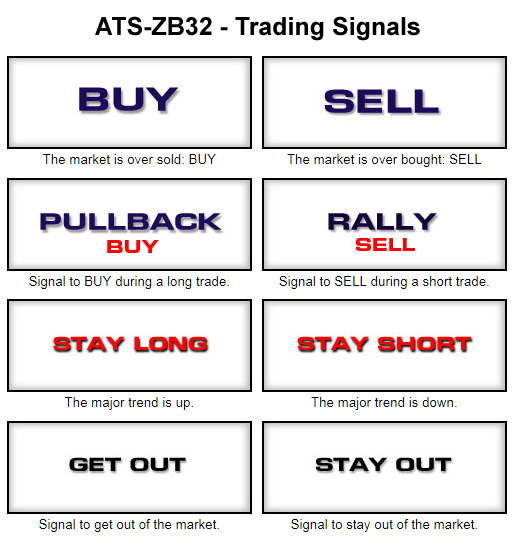
The system generates "BUY" and "SELL" signals.
When you get a BUY signal go LONG.
When you get a SELL signal go SHORT.
A "PULLBACK" signal is a secondary "BUY" signal.
A "RALLY" signal is a secondary "SELL" signal.
When the system is in the market you will see either
an "X" to denote that the system is short, or
an "L" to denote that the system is long,
|
The system is either LONG or SHORT.
When the system is LONG we get a L sign.
If we get a PULLBACK signal it means the system is LONG and this is a secondary BUY signal.
When the system is SHORT we get a X sign.
If we get a RALLY signal it means the system is SHORT and this is a secondary SELL signal.
Sometimes we may get a GET OUT signal to get out of the market.
Then we may get a STAY OUT signal for a few weeks to stay out of the market.
All these signals are clearly displayed on the Detail Report week by week.
The TREND Function gives you the following signals:
A 'TRD-EXIT to get out followed by a 'BUY' or a 'SELL'
A 'RV-BUY' signal to reverse and go LONG.
A 'RV-SELL' signal to reverse and go SHORT.
Both these signals are followed by a 'GET-OUT' to close the reverse position.
TREND also report these signals on the Trend Detail report.
In the course of a complete trade cycle, most of the times the system may generate more BUY or SELL signals, when it is already LONG or SHORT.
I call these the SECONDARY trades because these signals are generated after the first or primary signal. These signals are shown on the Detail Report on the right hand side and are reported separetely on the 'Multiple Trades' report.
In order to take advantage of these secondsry signals you MUST have the proper funds for each new contract added. Otherwise you will be over trading and if something goes wrong you can loose a lot of money.
When you get a signal to "GET OUT" close the trade and wait for the system to generate another BUY or SELL signal.
When making the initial trade do not bargain with the market. Go "At the market" on Monday morning or Sunday afternoon when the market opens..
Check the 'Stop Loss' report for the correct STOP to place.
The stop now is shown on the Control Panel after the system comes to a stop.
Itis also shown on the Detail Report.
Trading the ATS-ZB32 is as simple as this.
The new function TREND.
"TREND" is a new function that sits on top of the ATS-ZB32 to make sure that the system is always trading in the direction of the market.
TREND checks the system at all times and if a trade starts losing money, TREND checks the direction of the market. If the market is moving in the opposite direction, TREND gives you a signal to "TRD-EXIT" the trade usually with a smaller loss.
The signal TRD-EXIT from TREND is reported on the Detail Report.
When the signal TRD-EXIT goes away resume the trade.